All Document - File Viewer
AinulMardhiyahTools
3.242.00 Reviews
- Version
- 1.0
- Installs
- 100.00K
- Age Rating
- Everyone
Screenshots
Our Review of All Document - File Viewer
 Analysis by Appyee
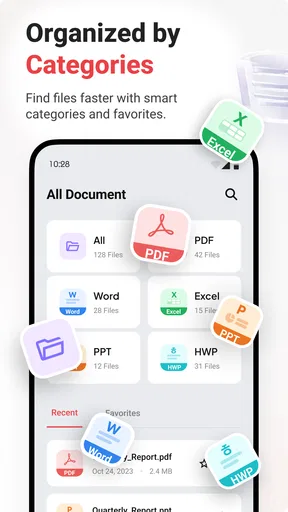
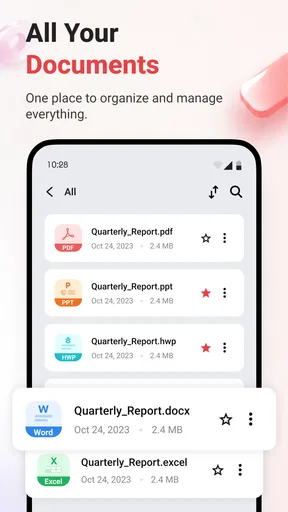
Opening a document on a phone often becomes harder than it should be. A file arrives in a message, sits in a download folder, and then the search begins for an app that can read it without sending me through a maze of menus. All Document - File Viewer is built around that everyday irritation. It is a free tools app from AinulMardhiyah that focuses on opening, reading, and managing documents from one place.
After spending time with it, I see the appeal immediately: it is aimed at people who want a straightforward document utility rather than a full office suite. The app is currently at version 1.0, works on Android 8.0 and newer, and carries an Everyone age rating. Its average rating is 3.2 from around 236 ratings, with 42 written reviews, so the public response is mixed rather than overwhelmingly positive. That matches my impression: the basic idea is useful, but the experience depends heavily on how many document types and management tools you expect from it.
Why a simple document viewer can save real time
The recurring problem is not usually creating a document. It is finding and opening one quickly. I might receive a form, a schedule, a manual, or a work attachment while away from a computer. Switching between a file manager, a browser, a messaging app, and several separate viewers creates unnecessary friction. A dedicated document utility can make that chain shorter by giving me one familiar place to start.
That is where this app makes sense. Its store summary promises easy access to documents anytime, but the more practical benefit is reducing the number of decisions between receiving a file and reading it. Instead of wondering which installed app will handle an unfamiliar document, I can try this viewer first and use its document-management approach as a central starting point.
I would not describe it as a replacement for a desktop office program. The name and positioning point toward viewing and handling files, not advanced editing, collaboration, or document production. That distinction matters. If I only need to inspect a file, check information, or keep track of documents on my phone, the focused approach is helpful. If I need to revise layouts, build spreadsheets, add comments, or collaborate with a team, I would look toward a more specialized office application.
The app has already passed the threshold of practical visibility, with over one hundred thousand installs. That does not guarantee that it will suit every phone or workflow, but it suggests that the basic need is common. I think the most useful way to judge it is not by comparing it with feature-heavy office suites, but by asking a simpler question: does it make routine document access less annoying?
Getting started without overcomplicating the phone
My first recommendation is to treat the app as a document doorway rather than immediately expecting it to become a complete file-management system. Install it, open the document area, and begin with files already stored on the device. This gives a clearer sense of how it fits into your existing folders and whether it recognizes the documents you actually receive.
A useful first setup habit is to test the files that matter most to you. Do not rely only on a single sample document. Try a recent attachment, a downloaded form, and an older file that has been sitting in storage. This quickly reveals whether the app is convenient for your personal mix of documents. It also prevents a common mistake: assuming that a viewer is useful simply because it opens one familiar file.
I also suggest keeping the first session focused. Rather than importing or reorganizing everything at once, open a handful of documents and notice how easily you can return to them. The best document tools earn their place by making repeat access simple. If finding a file still requires several unrelated steps, the app may be better as an occasional viewer than as your main document hub.
Because the current release is version 1.0, I approach it with realistic expectations. An early version can be perfectly adequate for basic reading while still feeling less polished around edge cases. That is particularly important with documents because files can differ in formatting, size, embedded elements, and layout. A clean first impression is encouraging, but repeated use is what tells me whether a viewer is dependable.
Everyday situations where it earns its place
One realistic example is a travel or appointment day. Someone sends me a document while I am away from my laptop, perhaps a confirmation, a set of instructions, or a form to consult. I do not necessarily need to edit it. I need to open it quickly, read the relevant section, and return to it later without searching through several chat threads. A dedicated viewer is valuable in that moment because it keeps the task narrow.
Another scenario is household paperwork. Receipts, warranty documents, school notices, and service instructions tend to accumulate in different locations. I can use a document app as a first stop when I need to inspect one of them. The real time saving comes from avoiding the habit of opening random applications until one accepts the file.
It can also help students and casual readers who download reference material but do not need to modify it. For them, a lightweight reader may be more comfortable than installing a large productivity suite. The trade-off is that a viewer-oriented workflow is strongest when the goal is reading and basic organization, not active authoring.
For work, I would use it as a quick inspection tool. If a colleague sends a document during a meeting, I can check the contents without waiting to reach a computer. I would still keep a dedicated editor available for anything involving revisions, formatting, signatures, tracked changes, or shared feedback. The app is most useful as the first response to a file, not necessarily the final destination for every document task.
There is also a small but important organizational advantage in separating document reading from document creation. When I open a file only to verify a detail, an office suite can feel excessive. A focused viewer reduces the temptation to start editing or saving duplicate versions. That makes it suitable for quick checks, provided the file opens cleanly and the navigation remains comfortable.
Where the app removes friction, and where it does not
The clearest friction it addresses is app hunting. Android phones often accumulate several applications that can open documents, but that does not always make the choice easier. A single document-focused tool gives me a predictable option when a file arrives unexpectedly. That predictability is more valuable than it sounds, especially when I am in a hurry.
It can also reduce the mental load of remembering where a document came from. Instead of thinking, “Was that attachment in email, messaging, downloads, or cloud storage?” I can start from a document-management interface and work outward. The benefit is greatest for people who regularly move between sources and want a consistent reading point.
My practical tip is to use it for triage. Open a new document, decide whether it is worth keeping, and then place it where you can find it later. This is more efficient than allowing every attachment to remain buried in its original conversation. The app does not need to replace the phone’s entire storage system to be useful; it only needs to make the first inspection and follow-up easier.
Another useful habit is to avoid judging performance from a single successful opening. Scroll through a longer document, move between sections, and return to the file after closing it. A viewer can appear fine during a quick test but become frustrating when used for repeated reading. I pay attention to whether navigation feels natural and whether the document remains easy to locate afterward.
That said, the app cannot remove every kind of document friction. If the file requires editing, conversion, advanced formatting, or collaborative review, the viewer category itself becomes a limitation. I would rather open a document here quickly and then hand it to the right specialist tool than force one app to handle jobs it was not designed to solve.
How it compares with familiar alternatives
The usual alternative is opening files directly from the phone’s file manager. That approach costs nothing extra and may already be enough for someone who handles documents only occasionally. Its weakness is that the file manager is designed for storage, not necessarily for a comfortable reading workflow. All Document - File Viewer is more appealing when I want document access to feel like a dedicated activity instead of another folder operation.
Another alternative is a large office suite. Those apps are better when I need to create, edit, format, share, or collaborate on files. They often make more sense for workplace documents and school projects. The downside is that they can feel oversized for a person who simply wants to read an attachment. This app has a clearer role when speed and simplicity matter more than a long feature list.
Cloud storage viewers are useful when documents already live online and need to remain synchronized across devices. They are the better choice for people whose main workflow depends on shared folders or team access. A local document utility is more natural for files downloaded to the phone or received through everyday channels. I would choose between them based on where my files live, not on which app has the most buttons.
There is also the option of using the viewer built into a browser or messaging application. That is convenient for one-off reading, but it can make later retrieval awkward. A dedicated tool becomes worthwhile when the same problem appears repeatedly: opening a file now, then finding it again tomorrow. The app’s value is therefore cumulative. The more often I handle documents, the more I appreciate a consistent starting point.
Who should use it, and who should skip it
I would recommend trying it if you regularly receive documents on an Android phone and want a free, focused place to open and manage them. It is especially suitable for casual readers, students checking reference material, households handling paperwork, and workers who need quick access while away from a computer. The Everyone rating also makes it approachable for general household use.
I would be more cautious if document work is central to your job. Editors, designers, administrators, and collaborative teams usually need more than viewing. They may be better served by an office suite or a specialized document workflow that supports the exact actions they perform every day. Installing this app alongside those tools can still make sense, but I would not expect it to replace them.
People who rarely open documents may also find the phone’s existing tools sufficient. The app earns its space through repetition. If I open one document every few months, adding another utility may not improve anything. If I open several each week, the convenience becomes easier to justify.
My verdict after looking beyond the basic promise
All Document - File Viewer solves a modest but recurring problem: getting from a document file to readable content without unnecessary detours. Its strengths are its focused purpose, free access, and suitability for quick everyday checks. The most effective workflow is to use it as a first-stop viewer, a lightweight document shelf, and a way to separate reading from more demanding editing tasks.
The limitations are just as important. A focused viewer should not be mistaken for a full office environment, and version 1.0 suggests that I should judge it by its core routine rather than expect a mature ecosystem around every edge case. The mixed average of 3.2 shows that it will not be a universal favorite, so I would test it with the documents I actually use before making it central to my workflow.
My honest recommendation is conditional but positive: if your main annoyance is opening and revisiting ordinary documents on an Android phone, this free tools app is worth trying. Start with a few real files, use it for quick triage, and keep a stronger editor for work that demands changes. Its real advantage is not doing everything; it is shortening the distance between receiving a document and understanding what is inside.
For me, that is enough to give it a useful place on a phone, as long as I keep its role clear. It is a practical reader and manager for routine access, not a substitute for every document application. Used within that boundary, All Document - File Viewer can save small amounts of time repeatedly, and those small savings are exactly what make a simple utility worthwhile.
Verdict
Strengths of All Document - File Viewer
- Opens many document formats from one convenient mobile app.
- Built-in search makes finding text in long files quick and easy.
- Supports viewing files stored locally without requiring an internet connection.
- Simple interface is accessible for users with limited technical experience.
- Useful for checking documents while traveling or away from a computer.
Limitations of All Document - File Viewer
- Some advanced editing features may be unavailable or limited.
- Large PDFs and office files can take longer to load on older devices.
- Free use may include advertisements or prompts for premium features.
- Formatting may not always appear exactly as it does in desktop applications.
- The app may request broad storage access to find and open your files.
Other Releases by AinulMardhiyah
View All
Volume Booster – Audio Center
Tools4.6
Similar Picks in This Category
View All
Google LLC4.0

Gboard - the Google Keyboard
Google LLC4.5

Google Play services
Google LLC4.3

Google Play Store
Google LLC4.9

Files by Google
Google LLC4.5

SHAREit: Transfer, Share Files
Smart Media4U Technology Pte.Ltd.4.3
Frequently Asked Questions
What is All Document - File Viewer used for?
All Document - File Viewer is designed to open and read several common document formats from one place. During testing, it was useful for quickly viewing files such as PDFs, Word documents, spreadsheets, presentations, and text files without switching between multiple apps. It is mainly a viewing tool, so users should not expect the same advanced editing, formatting, or collaboration features found in dedicated office suites.
Which file formats does All Document - File Viewer support?
The app is intended to support a broad selection of frequently used document types, including PDF files and popular Microsoft Office formats such as DOC, DOCX, XLS, XLSX, PPT, and PPTX. Compatibility can depend on the file’s structure, fonts, embedded media, and the app version installed. Before relying on it for important work, test your specific documents to confirm that pages, tables, images, and formatting appear correctly.
Can I edit documents or only view them?
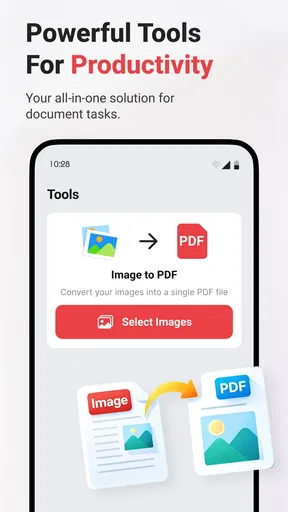
All Document - File Viewer is primarily focused on opening, reading, and managing documents rather than providing a complete editing environment. You may be able to perform basic actions such as zooming, searching, sharing, renaming, or organizing files, depending on the format and device. For substantial changes to text, formulas, slides, or layouts, a dedicated document editor will usually be more suitable.
Does the app work offline?
The app can generally be useful offline when documents are already stored on your phone or tablet, allowing you to open and review local files without an active internet connection. However, features such as downloading files, accessing cloud storage, displaying advertisements, checking for updates, or using online services may require connectivity. Offline behavior can vary by version, so verify permissions and test it before traveling.
Is All Document - File Viewer safe and free to use?
The application may be available as a free download, but free versions can include advertisements, optional purchases, or limitations on certain features. As with any file-management utility, review the permissions requested during installation and avoid opening files from unknown sources. Downloading it through the official Android or iOS store is the safest approach, and users should check the store listing for the latest privacy, security, and pricing information.
